When you create an email, letter or phone call through SDK (Plugin, Workflow or from your website or Silverlight application) you might get the error 'Creating Entity with an invalid parent. Entity: Email'
The reason behind this is your regarding object does not support activity association.
All you have to do is navigate the entity from Customisation and tick Activities in the 'Communication & Collaboration' section and publish the entity.
Hope this will help.
Friday, December 13, 2013
Tuesday, May 28, 2013
Moving the notes section to the top of the page
When you move the notes section to the top of the form and when the form is loaded, it automatically scrolls down and user has to manually scroll up to access the notes section.
If you want to see the notes section without scrolling please proceed the below steps.
1. If your have already added JQuery web resource to the form then just copy below code to a function and call at form- onload
2. Or if you prefer the javascrips then just copy below code to a function and call at form- onload
If you want to see the notes section without scrolling please proceed the below steps.
1. If your have already added JQuery web resource to the form then just copy below code to a function and call at form- onload
$("#crmFormTabContainer").scrollTop(0);
2. Or if you prefer the javascrips then just copy below code to a function and call at form- onload
document.getElementById('crmFormTabContainer').scrollTop = 0;
Friday, February 22, 2013
Get System Users From Specific Team
Today I had a very simple request, which is to get System Users in a specific team. Since it was a very simple task I just Google and try to find a sample. I was amazed as there was no such exaample in the Net. So I had to write my own. Once it is done, I just thought to share it as it might be useful.
Here is the code.
1. First example is to get the System Users in a Team
2. Second example is to get System Users as ActivityParty that you might need to link with an Activity.
Here is the code.
1. First example is to get the System Users in a Team
2. Second example is to get System Users as ActivityParty that you might need to link with an Activity.
public List<SystemUser> GetTeamUsers(string teamName)
{
return (from user in Context.CreateQuery<SystemUser>()
join teamMembership in Context.CreateQuery<TeamMembership>()
on user.SystemUserId.Value equals teamMembership.SystemUserId
join team in Context.CreateQuery<Team>() on teamMembership.TeamId.Value equals team.TeamId.Value
where team.Name == teamName
select user
).ToList();
}
public List<ActivityParty> GetTeamUsersAsActivityParty(string teamName)
{
return (from user in Context.CreateQuery<SystemUser>()
join teamMembership in Context.CreateQuery<TeamMembership>()
on user.SystemUserId.Value equals teamMembership.SystemUserId
join team in Context.CreateQuery<Team>() on teamMembership.TeamId.Value equals team.TeamId.Value
where team.Name == teamName
select new ActivityParty
{
PartyId = new EntityReference { LogicalName = user.LogicalName, Id = user.SystemUserId.Value }
}).ToList();
}
Thursday, September 6, 2012
How to join 2 entities in LINQ when where clause is not constant
When we join 2 entities using linq in C#, in where clause has fixed variables in most of the times.
For an example, we want to find records where the Lookup Id is equal to a constant value or where clause is greater than for a specific date.
In this kind of cases, we can write very simple linq query.
But sometimes we have to join 2 (or more) entities and we want to filter records with the variables in between them.
Example
We have 1 to many relationship with contacts and visits
And we want to get contact Ids where Contact Agreement Date is greater than Visit Date. And hence Contact.AgreementDate and Visit.VisitDate are not constant.
We can write the query in SQL as below
If we write this in C#, we get below query
Check the right hand side of the below where clase
But this can be done using anonymous types.
For an example, we want to find records where the Lookup Id is equal to a constant value or where clause is greater than for a specific date.
In this kind of cases, we can write very simple linq query.
But sometimes we have to join 2 (or more) entities and we want to filter records with the variables in between them.
Example
We have 1 to many relationship with contacts and visits
And we want to get contact Ids where Contact Agreement Date is greater than Visit Date. And hence Contact.AgreementDate and Visit.VisitDate are not constant.
We can write the query in SQL as below
select contact.Id from new_visit visit inner join Contact on visit.new_contactId = contact.ContactId
and visit.new_VisitDate >= contact.new_AgreementDate where visit.statecode = 0 and contact.StateCode = 0
If we write this in C#, we get below query
var query = from visit in context.CreateQuery<new_visit>()
join contact in context.CreateQuery<Contact>() on visit.new_contactId.Id equals contact.ContactId
where visit.new_VisitDate >= contact.new_AgreementDate
where visit.statecode.Value == new_visitState.Active
where contact.statecode.Value == ContactState.Active
select contact.Id
Check the right hand side of the below where clase
where visit.new_VisitDate >= contact.new_AgreementDatesince the right side is not constant, Linq cannot query the data we want.
But this can be done using anonymous types.
IOrganizationService service = new CRMInternal().GetService();
OrganizationServiceContext context = new OrganizationServiceContext(service);
var query = from visit in context.CreateQuery<new_visit>()
join contact in context.CreateQuery<Contact>() on visit.new_contactId.Id equals contact.ContactId
where visit.statecode.Value == new_visitState.Active
where contact.StateCode.Value == ContactState.Active
select new { contact.Id, visit.new_VisitDate, contact.new_AgreementDate };
var contacts = query.ToList().Where(p => p.new_VisitDate <= p.new_AgreementDate).Select(p => p.Id);
Thursday, July 26, 2012
Metadata contains a reference that cannot be resolved: 'http://Server:port/Org/XRMServices/2011/Organization.svc?wsdl'.
I've been connecting my CRM Development Server for last few months and today I installed CRM Outlook Client to my Local PC.
Once I installed the CRM Outlook Client, I couldn't connect to CRM.
My PC is 64 bit and I have 32 bit MS Office(and Outlook). I think that might be a reason that the CRM Outlook Client did not work. ( I got some errors when installing but was manged to install by manually installing "Microsoft Online Services Sign-in Assistance")
Since it did not work properly, I uninstalled the CRM Outlook Client. But just after that, and start my usual work I got following error
Metadata contains a reference that cannot be resolved: 'http://Server:port/Org/XRMServices/2011/Organization.svc?wsdl'.
After doing some research, I found that my machine.config file has been modified today.
I compared the "machine.config" file with one of colleague's PC and found the additional tag.
<system.net>
<defaultproxy enabled="true" usedefaultcredentials="true">
<proxy bypassonlocal="True" proxyaddress="###.com.sg">
</proxy>
</defaultproxy>
</system.net>
I then removed the whole "<system.net>" tag from the "machine.config" file. Everything is working fine now!
If you found the same error, remember to get a backup of the "machine.config" file before proceeding!
Tuesday, July 17, 2012
CRM Developers have more time to learn cross browser supporting Javascripts!
Microsoft earlier announced that they will include cross-browser support with CRM 2011 - Q2 2012 Service Update, and what that means is end-users will be able to login to CRM using browsers like Internet Explorer, Chrome, Firefox and Safari. Users can login to CRM 2011 from their mobile devices such as iPad, iPhone, Android, Blackberry and Windows Phone devices.
In most of CRM systems, we see developers include custom web pages to extend basic CRM features. We should try to minimize using custom web pages, and we should only implement such if the in-built Process Dialogs cannot full fill the customer requirements. We see Microsoft adding more features to Process Dialogs in rollups and sometimes we face customers, who really need some web pages like typical web pages! That’s when we have to implement custom web pages that we embedded to CRM Ribbon menu or CRM pages through IFrames. As CRM developers, we always checked our custom web page in Internet Explorer and if it works fine in IE, we just stop testing as we know uses cannot navigate to our pages using other browsers.
Microsoft just recently communicated that they are not including cross browser feature in the Q2 Service Update! They are planning to include the feature with the Q4 release. What is means to CRM developers? We have some more time to learn cross browser supporting Javascripts in our customer web pages. Because, once the end user start the CRM application from browsers not internet explorer browsers, we have to make sure our custom web pages also displays the content correctly and Javascripts work correctly.
So let’s utilize the additional time we got to learn more Javascripts and HTML that supports cross browser. And let’s make sure any web page we implement in future supports cross browser.
Some useful resources,
Microsoft delays Dynamics CRM mobile support for iPad, Android until Q4 2012
Q2 2012 Service Update – New delivery schedule
Tuesday, April 3, 2012
Dynamically changing Label Size in CRM fields
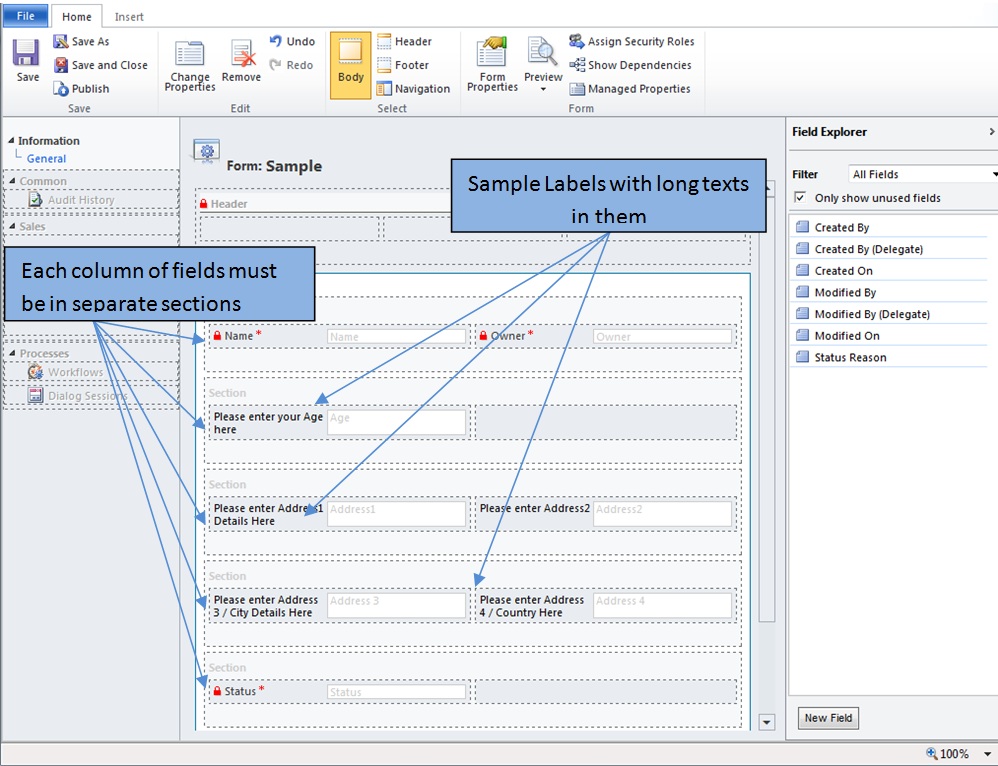
In the most of the times, we can manage the default width CRM provides to show a valid text to CRM labels. But there are occasions , that the customers really asking to put a lengthily text in to a CRM and they want it in one Line!
By default this cannot be possible, but still this can be implement by over writing CRM Table Styles in the Specific table.
For this you can do below steps.
1.create sections for each field, so the over write behavior will not effect to other fields in the Page.
2. Call the Functions for each and every field.
Example
Function: SetLabelWidth
Parameters: 'new_age', 144
3. Copy the SetLabelWidth function to the JavaScript Library
function SetLabelWidth(targetLabelName, newWidth)
{
var targetTable = null;
var colIndex = 0;
var sectionId;
var tabs = Xrm.Page.ui.tabs;
for (var i = 0; i < tabs.getLength(); i++)
{
var tab = tabs.get(i);
var sections = tab.sections;
for (var j = 0; j < sections.getLength(); j++)
{
var section = sections.get(j);
var controls = section.controls;
for(var k = 0; k < controls.getLength(); k++)
{
if(controls.get(k).getName() == targetLabelName)
{
sectionId = section._control._element.id;
colIndex = k + 1;
}
}
}
}
targetTable = document.getElementById(sectionId);
if(targetTable == null)
{
//Request field not found in any of the tables
return;
}
var continerTableWidth = targetTable.clientWidth;
var td1W = targetTable.rows[0].cells[0].clientWidth;
var td2W = targetTable.rows[0].cells[1].clientWidth;
var td3W = targetTable.rows[0].cells[2].clientWidth;
var td2C = targetTable.rows[0].cells[1].all[0].offsetWidth;
var td4W = 0;
var td4C = 0;
var sectionPadding = 20
var cellPading = 3;
if(targetTable.rows[0].cells[3] != null)
{
td4W = targetTable.rows[0].cells[3].clientWidth;
td4C = targetTable.rows[0].cells[3].all[0].offsetWidth;
}
else
{
td3W = continerTableWidth / 2;
}
//Break the Table Style
targetTable.style.tableLayout = "";
targetTable.width = continerTableWidth;
var controlNewWidth = 0;
if(colIndex == 1)
{
controlNewWidth = td1W + td2W - newWidth;
targetTable.rows[0].cells[0].width = newWidth;
targetTable.rows[0].cells[1].width = controlNewWidth;
if(td4W == 0)
{
targetTable.rows[0].cells[2].width = td3W;
}
else
{
targetTable.rows[0].cells[2].width = td3W - sectionPadding;
targetTable.rows[0].cells[3].width = td4W - (cellPading * 2);
targetTable.rows[0].cells[3].all[0].style.width = td4C;
}
}
else if(colIndex == 2)
{
controlNewWidth = td3W + td4W - newWidth;
targetTable.rows[0].cells[0].width = td1W + (cellPading * 2);
targetTable.rows[0].cells[1].width = td2W;
targetTable.rows[0].cells[2].width = newWidth - sectionPadding;
targetTable.rows[0].cells[3].width = controlNewWidth;
targetTable.rows[0].cells[1].all[0].style.width = td2C;
targetTable.rows[0].cells[3].all[0].style.width = controlNewWidth - (cellPading * 2);
}
else
{
return;
}
}
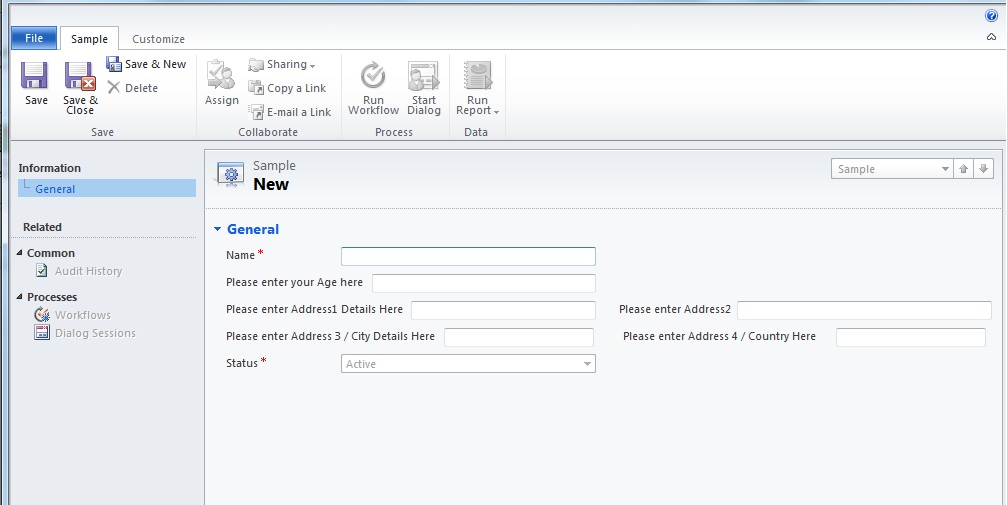
Then the fields will be display as below
Thursday, March 29, 2012
Picklists become inactive in Internet Explorer 9
Have you experienced below issue in CRM ?
When you open a record on an associated view, picklists become inactive in Internet Explorer 9.
Actually there is nothing much you can do, if you are a developer, because it's a bug in CRM 2011.
Microsoft has fixed this issue in their latest CRM Rollup 7, and you can find all the details from their site.
Update Rollup 7 for Microsoft Dynamics CRM 2011
Refresh Selected View on Button Click in CRM Ribbon
You may have implemented many buttons in CRM Ribbon area to perform your business transactions. And you may create new records, update or delete the records in the grid once the user clicks the Ribbon button. Then you may need to refresh the Grid.
There are many ways to refresh the page or grid, but the issue is once the page reload you will loose the selected view and CRM will load the Default View, instead of the user selected view. And if you want to keep the user selected view even after the Grid is refreshed, You can call the below java script inside your 'ribbon button click' after doing your actions, and before function ends.
grid = window.parent.frames('contentIFrame').document.getElementById('crmGrid');
grid.Refresh();
Tuesday, February 21, 2012
Get the Entity Data based on user time zone
If your CRM application is used by multinational users, and if you have custom web pages or any client applications, you have to make sure you show the date and time with the user's time zone, rather than just showing the value you get by retrieving from the CRM Service.
I have below described an easier method to do so.
First we have to get the current user's time zone.
And then let's retrieve the entity object from the CRM Service.
Then we can call our method that will adjust all the DateTime properties in the CRM entity.
I have below described an easier method to do so.
First we have to get the current user's time zone.
And then let's retrieve the entity object from the CRM Service.
Then we can call our method that will adjust all the DateTime properties in the CRM entity.
public partial class SystemUser
{
RetrieveUserSettingsSystemUserResponse userSettingsSystemUserResponse;
///
/// Initialize RetrieveUserSettingsSystemUserResponse
///
private void InitializeUserSettings()
{
if (this.Id != Guid.Empty)
{
RetrieveUserSettingsSystemUserRequest userSettingsSystemUserRequest =
new RetrieveUserSettingsSystemUserRequest {
RequestId = this.Id, ColumnSet = new ColumnSet(true), EntityId = this.Id };
userSettingsSystemUserResponse = (RetrieveUserSettingsSystemUserResponse)CrmServiceManager
.GetService(this.Id).Execute(userSettingsSystemUserRequest);
}
}
///
/// Get a date and returns it back adjusting TimeZone difference
///
public DateTime GetUserTimeZoneBasedDateTime(DateTime dateTime)
{
if (this.Id != Guid.Empty)
{
if (userSettingsSystemUserResponse == null)
{
InitializeUserSettings();
}
if (userSettingsSystemUserResponse != null
&& userSettingsSystemUserResponse.Results != null
&& userSettingsSystemUserResponse.Results.Count > 0)
{
return dateTime.AddMinutes(
((UserSettings)userSettingsSystemUserResponse.Entity).TimeZoneBias * -1);
}
}
return dateTime;
}
///
/// Get the Entity and returns it back adjusting TimeZone difference
///
public T GetEntityWithUserTimeZoneBasedDateTime<t>(T t) where T : Entity
{
if (t != null)
{
Dictionary<string, Datetime> changedDateTimeDictionary = new Dictionary<string, Datetime>();
foreach (var attribute in t.Attributes)
{
if (attribute.Value is DateTime)
{
changedDateTimeDictionary.Add(
attribute.Key, GetUserTimeZoneBasedDateTime((DateTime)attribute.Value));
}
}
foreach (var item in changedDateTimeDictionary)
{
t.Attributes[item.Key] = item.Value;
}
}
return t;
}
And now you can call the method as below
Guid currentUser = //Set the current user
//Get the record from CRM Service using any convinient method
Account account = new CommonFacade().Get<account>(accountId);
//Pass the retrieved object and with the current user
//That adjust the all DateTime properties in the object
//And reassigned it before displaying the entity
account = new SystemUser {Id = currentUser }.GetEntityWithUserTimeZoneBasedDateTime<account>(account);
//Now you can use the object to any display purposed
//Example
accountCreatedOnLabel.Text = account.createdOn.ToString();
Monday, February 13, 2012
Error: You do not have the necessary permissions to change the domain logon name for this user
You may get an error called "You do not have the necessary permissions to change the domain logon name for this user" when you deploy you plugin to CRM Server in CRM 2011 and when it was triggered. Then you should check whether the plugin is a synchronous plugin or an asynchronous plugin.
If it is a synchronous plugin, means that this error occurs through IIS. And if this plugin is a asynchronous plugin, means that this error occurs through Microsoft Dynamics CRM Asynchronous Processing Service.
1. If it a synchronous plugin(means that this error occurs through IIS)
Check the 'CRMAppPool' running user
Add the Local Administrator Role to the user
Finally do not forget to reset IIS.
2. If it a asynchronous plugin(means that this error occurs through Microsoft Dynamics CRM Asynchronous Processing Service)
Navigate to the Service and check the service running user
Add the Local Administrator Role to the user
Finally do not forget to reset IIS.
Thursday, February 9, 2012
Sending Emails using SendEmailRequest
When you want to send emails through CRM 2011, it is important to set the IssueSend boolean field explicitly.
Because the default value is false, and if the value is false, CRM marks the email as 'Sent' but CRM 2011 does not send the email. So if you want to fire the email to end user, you must set the IssueSend field to true
1. Method 01
Because the default value is false, and if the value is false, CRM marks the email as 'Sent' but CRM 2011 does not send the email. So if you want to fire the email to end user, you must set the IssueSend field to true
1. Method 01
//The below code will mark as the email as 'Sent' but CRM 2011 will not send the email to the relevant user
SendEmailRequest sendEmailRequest = new SendEmailRequest { EmailId = emailId, TrackingToken = ""};
2. Method 02
//The below code will mark as the email as 'Sent' but CRM 2011 will not send the email to the relevant user
SendEmailRequest sendEmailRequest = new SendEmailRequest { EmailId = emailId, TrackingToken = "", IssueSend = false};
3. Method 03
//The below code will attempt to send the email to the relevant user
//And if it success, CRM 2011 will mark the email as Sent
SendEmailRequest sendEmailRequest = new SendEmailRequest { EmailId = emailId, TrackingToken = "", IssueSend = true};
Friday, January 27, 2012
Mapping Value from Parent Form to child View in CRM
Sometimes, you have to get the value from parent form and has to show in the child form. Clients may use 2 methods to open child view.
1. Using Associate Views
2. Using Sub Grid
3. Using button in ribbon
Base on the clients' selected method, we have to implement the code, because if the child form is created using Associate Views, window.parent.opener.Xrm.Page.data will be null and when calling from sub grids window.top.opener.parent.Xrm.Page.ui will be null.
So here, I have implemented a method to check both conditions. And in the Parent form, you may have a Lookup, int, decimal or picklist, that has to be mapped with different control in child page
Then, copy below function to your common Library JS (If you dont have a common JS web resource, it's time to create a one)
Then from the child Page form,
1. Add the Common Javascript web Resouce
2. And in form onLoad event, called the function as below
MapFromParentForm with the dynamic parameters as 'new_name', 'new_contactId' where 'new_name' is the control in child form and 'new_contactId' is in the parent form
1. Using Associate Views
2. Using Sub Grid
3. Using button in ribbon
Base on the clients' selected method, we have to implement the code, because if the child form is created using Associate Views, window.parent.opener.Xrm.Page.data will be null and when calling from sub grids window.top.opener.parent.Xrm.Page.ui will be null.
So here, I have implemented a method to check both conditions. And in the Parent form, you may have a Lookup, int, decimal or picklist, that has to be mapped with different control in child page
Then, copy below function to your common Library JS (If you dont have a common JS web resource, it's time to create a one)
function MapFromParentForm(target, source)
{
var targetControl = Xrm.Page.data.entity.attributes.get(target);
var sourceControl;
if (window.top.opener.parent != null && window.top.opener.parent.Xrm != null
&& window.top.opener.parent.Xrm.Page != null
&& window.top.opener.parent.Xrm.Page.ui != null)
{
sourceControl = window.top.opener.parent.Xrm.Page.data.entity.attributes.get(source);
}
else if(window.parent != null && window.parent.opener != null
&& window.parent.opener.Xrm != null
&& window.parent.opener.Xrm.Page != null
&& window.parent.opener.Xrm.Page.data != null
&& window.parent.opener.Xrm.Page.data.entity != null
&& window.parent.opener.Xrm.Page.data.entity.attributes != null)
{
sourceControl = window.parent.opener.Xrm.Page.data.entity.attributes.get(source);
}
if (targetControl != null && sourceControl != null)
{
var sourceValue;
if (sourceControl.getAttributeType() == "lookup")
{
sourceValue = sourceControl.getValue()[0].name;
}
else
{
sourceValue = sourceControl.getValue();
}
if (targetControl.getAttributeType() == "lookup")
{
targetControl.setValue(sourceValue)
}
else if (targetControl.getAttributeType() == "optionset")
{
targetControl.setValue(parseInt(sourceValue))
}
else
{
targetControl.setValue(sourceValue)
}
}
}
Then from the child Page form,
1. Add the Common Javascript web Resouce
2. And in form onLoad event, called the function as below
MapFromParentForm with the dynamic parameters as 'new_name', 'new_contactId' where 'new_name' is the control in child form and 'new_contactId' is in the parent form
Thursday, January 19, 2012
The Scope of CRM Pre & Post Images
Have you confused with the scope of CRM Pre & Post Image scope. And when the each image exists & when not? You can now easily find it out in below image.
Tuesday, January 17, 2012
Object address not found on party or party is marked as non-emailable
When you want to send an email using CRM, you may use direct method to send email or you may use SendEmailFromTemplateRequest. And sometimes you may get the error "Object address not found on party or party is marked as non-emailable". Once you debug and found the error, you will be differently know that either the email address of 'To' is blank or marked as 'No Email' or 'No Bulk Email'. But when if fields are set correctly, and if you get the same error, once shall we do?
Other than the To Address, you have to check the 'From' users email validity as well(which we usually forget to set), because if it is missing, you will get the same error 'Object address not found on party or party is marked as non-emailable'
And what will happen if the From field is blank? Then CRM conside From user as execution context user. (May be plugin executer in Plugin Context or executer in CRM Async Service for workflows or the credentials you used to communicate with CRM Service.) And if the email address of this user is missing, you will get the same error. "Object address not found on party or party is marked as non-emailable"
Thursday, January 5, 2012
Show CRM Form based on User Role
Sometimes we have to show CRM Form by logged user role. The best way to do this is assign form to correct Security role using CRM Custermizations. But sometimes we have to show the correct Form using Javascripts. For that you can use the below code.
Copy the below function to your global/common javascript file
function LoadUserForm(formName)
{
var allForms = Xrm.Page.ui.formSelector.items.get();
if(allForms != null && allForms.length > 1)
{
for(var i = 0; i < allForms.length; i++)
{
var currentName = allForms[i].getLabel().toLowerCase();
if(currentName == formName)
{
Xrm.Page.ui.formSelector.items.get(i).navigate();
break;
}
}
}
}
Then copy below function to all forms in the same entity
function window.onload()
{
var currentUserRole = GetCurrentUserRole();
if(currentUserRole == 'System Administrator')
{
LoadUserForm('SA Form')
}
else if(currentUserRole == 'Sales Manager')
{
LoadUserForm('SM Form')
}
else if(currentUserRole == 'System Operator')
{
LoadUserForm('SO Form')
}
}
Wednesday, November 23, 2011
Reset App Pool in Command Line
One of major issue happens when you customize CRM entities is, even you publish the solution, SOMETIMES your changes are not getting applied and hence you need to do a IIS Reset.
This is becomes an issue,
1. when the client is also accessing the system
2. QA team performing testing in the same CRM Instance
3. Your team members may be using the system or in a debugging their code.
So instead of doing a IIS Reset, you can do a Application Pool reset. But normally that need to open the Internet Information Service (IIS InetMgr.exe) and need to navigate to App pools and you have to manyually reset all the relevent application pools.
Instead of that you may create a bat file, and call once.
@echo off
echo.
echo recycling 'CRMAppPool' Application Pool
%windir%\System32\inetsrv\appcmd recycle apppool /apppool.name:CRMAppPool
echo.
echo.
echo recycling 'CRMAppPool' Application Pool
%windir%\System32\inetsrv\appcmd recycle apppool /apppool.name:CRMAppPool
echo.
Thursday, November 17, 2011
Hide Section in CRM 2011
Do you want to hide a section in CRM 2011?
Steps
1. Open the customization form
2. Double click the section and copy the section Label. Let's say it's name is 'General'
3. Copy the below java script function
4. Call the function in CRM Form Load event
HideSection('General');
Steps
1. Open the customization form
2. Double click the section and copy the section Label. Let's say it's name is 'General'
3. Copy the below java script function
function HideSection(sectionLabel)
{
try
{
var tabs = Xrm.Page.ui.tabs;
for (var i = 0; i < tabs.getLength(); i++)
{
var tab = tabs.get(i);
var sections = tab.sections;
for (var j = 0; j < sections.getLength(); j++)
{
var section = sections.get(j);
if (section.getLabel() == sectionLabel)
{
section.setVisible(false);
break;
}
}
}
}
catch (err)
{
}
}
4. Call the function in CRM Form Load event
HideSection('General');
Wednesday, November 2, 2011
Cancel/Inactivate a record when it is already in the same status

You many need to cancel Order, Invoice or any other record using workflow.
Before cancelling the workflow, you must check whether the record is already in cancel status.
If the record is already in cancel status, when you are trying to cancel it again, you will experience below error.
Workflow paused due to error: Unhandled Exception:
System.ServiceModel.FaultException`1[[Microsoft.Xrm.Sdk.OrganizationServiceFault, Microsoft.Xrm.Sdk, Version=5.0.0.0, Culture=neutral, PublicKeyToken=31bf3856ad364e35]]: The entity cannot be closed because it is not in the correct state.Detail:
at Microsoft.Crm.Extensibility.OrganizationSdkServiceInternal.Execute(OrganizationRequest request, CorrelationToken correlationToken, CallerOriginToken callerOriginToken, WebServiceType serviceType) at Microsoft.Crm.Extensibility.InprocessServiceProxy.ExecuteCore(OrganizationRequest request) at Microsoft.Crm.Workflow.Services.SetStateActivityService.<>c__DisplayClass1. -2147220941 The entity cannot be closed because it is not in the correct state. 2011-11-02T06:09:20.2231504Z
-2147220941 The entity cannot be closed because it is not in the correct state. 2011-11-02T06:09:20.2231504Z b__0(IOrganizationService sdkService) at Microsoft.Crm.Workflow.Services.ActivityServiceBase.ExecuteInTransactedContext(ActivityDelegate activityDelegate) at Microsoft.Crm.Workflow.Services.SetStateActivityService.SetStateInternal(String entityName, Guid entityId, Int32 state, Int32 status) at Microsoft.Crm.Workflow.Services.SetStateActivityService.ExecuteInternal(ActivityContext executionContext, SetState setState) at Microsoft.Crm.Workflow.Services.SetStateActivityService.Execute(ActivityContext executionContext, SetState setState) at System.Activities.CodeActivity.InternalExecute(ActivityInstance instance, ActivityExecutor executor, BookmarkManager bookmarkManager) at System.Activities.Runtime.ActivityExecutor.ExecuteActivityWorkItem.ExecuteBody(ActivityExecutor executor, BookmarkManager bookmarkManager, Location resultLocation)
Tuesday, November 1, 2011
Workflow Scope
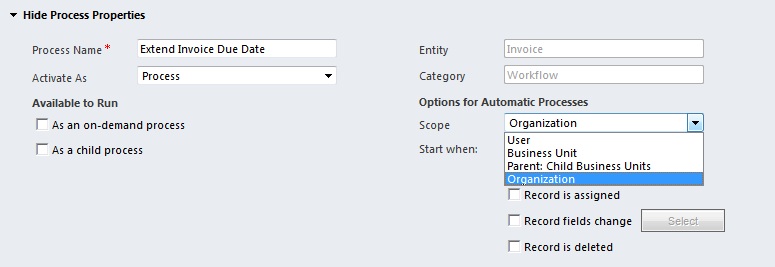
One of big mistakes we do when we are implementing CRM workflows are we do not set the Workflow scope. By default CRM sets the workflow scope to User Level
So the workflow is executing only when the workflow assign user triggers the workflow. To fix the problem, you have to set the scope to 'Organization' level, so the workflow will fire when any user execute a task that triggers the workflow.
Subscribe to:
Posts (Atom)